







Table view is commonly used to show lists of data. A table view is the view object that displays table’s data and instance of UITableView. Each visible row in a table view is implemented by UITableViewCell. Table views are not responsible for storing your table’s data. They store only enough data to draw the rows that are currently visible. Table views get their configuration data from an object that conforms to the UITableViewDelegate protocol and their row data from an object that conforms to the UITableViewDataSource protocol.
Follow the steps below to create UITableView sample:
1.Open Xcode and create new view based project named ‘SimpleTable’
2.Modify code in the SimpleTableViewController.h file as follow:
#import <UIKit/UIKit.h> @interface SimpleTableViewController : UIViewController <UITableViewDelegate,UITableViewDataSource>{ NSArray *listData; } @property(nonatomic, retain) NSArray *listData; @end3.Open SimpleTableViewController.xib file and drag Table View from Library over to the View Window.
4.Connect tableview’s dataSource and delegate from connection inspector to File’s Owner.
5.Modify code in the SimpleTableViewController.m file as follow:
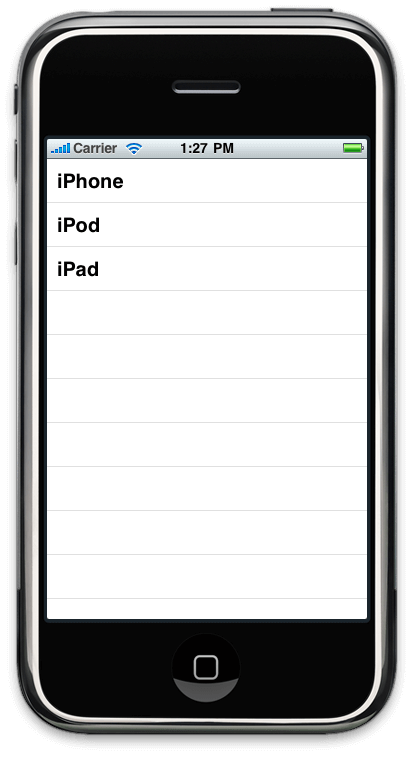
#import "SimpleTableViewController.h" @implementation SimpleTableViewController @synthesize listData; - (void)viewDidLoad { NSArray *array = [[NSArray alloc] initWithObjects:@"iPhone", @"iPod", @"iPad",nil]; self.listData = array; [array release]; [super viewDidLoad]; } - (void)dealloc { [listData dealloc]; [super dealloc]; } #pragma mark - #pragma mark Table View Data Source Methods - (NSInteger)tableView:(UITableView *)tableView numberOfRowsInSection:(NSInteger)section { return [self.listData count]; } - (UITableViewCell *)tableView:(UITableView *)tableView cellForRowAtIndexPath:(NSIndexPath *)indexPath { static NSString *SimpleTableIdentifier = @"SimpleTableIdentifier"; UITableViewCell *cell = [tableView dequeueReusableCellWithIdentifier:SimpleTableIdentifier]; if (cell == nil) { cell = [[[UITableViewCell alloc]initWithStyle:UITableViewCellStyleDefault reuseIdentifier:SimpleTableIdentifier] autorelease]; } NSUInteger row = [indexPath row]; cell.textLabel.text = [listData objectAtIndex:row]; return cell; } @endIn viewDidLoad we are creating an array of data to pass to our Table View.
We have also added two more methods of data source delegate which are mandatory to implement when your implementing UITableViewDataSource delegate.(NSInteger)tableView:(UITableView *)tableView numberOfRowsInSection:(NSInteger)sectionwhich specifies how many number of rows are there in one section of the Table View.
The default number of section in Table View is one.Another method is
- (UITableViewCell *)tableView:(UITableView *)tableView cellForRowAtIndexPath:(NSIndexPath *)indexPathWhich is called by table view when it needs to draw a row. This method is called n times and value of n is equal to value returned by first method. As this method is called once for every row,
if (cell == nil)checks, if cell exits before, if not create new cell. Here ‘indexPath’ parameter gives us current Indexpath of the row from which we can get the current drawing row. Then we set the text of textLabel property of the current drawing cell and finally return the cell to the Table View.
You can download the source code used in this tutorial from here
Output will look like this:
Output For SimpleTableView